Status page with custom domain
A good status page reduces support load and builds trust. Host it on a clean custom domain like status.example.com so customers know where to look when something goes wrong.
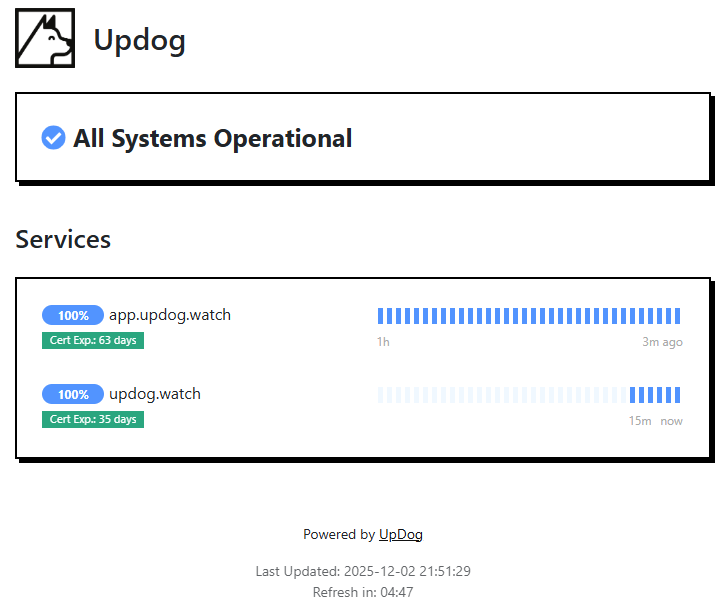
Why a custom-domain status page matters
During an incident, customers don’t want a detective story. They want a single URL that answers: “Is it you or is it me?” A custom-domain status page makes that URL obvious and brand-consistent.
What you can do with UpDog status pages
- Publish current status for your services and key components.
- Share incident updates with timestamps so customers know what’s happening.
- Host on a custom domain (like status.example.com) for trust and clarity.
- Keep it secure with HTTPS (and automatic SSL when supported by your configuration).
How to set it up (step-by-step)
- Create a status page in UpDog and choose which monitors/services to display.
- Pick a domain, usually
status.yourdomain.com. - Add the custom domain in UpDog’s status page settings.
- Update DNS as instructed (commonly a CNAME record).
- Wait for DNS to propagate, then verify the status page loads over HTTPS.
Best practices
Keep service names customer-readable
“Payments API” beats “svc-payments-v2”. Your internal dashboard can keep the nerd names—your status page should speak customer.
Post updates on a schedule
Even if the update is “still investigating,” a regular cadence reduces inbound support messages and restores confidence.
Don’t guess the root cause
Say what you know, what you’re doing next, and what users can expect. Speculation creates screenshots that live forever.
Troubleshooting
- Custom domain doesn’t resolve: verify your DNS record and wait for propagation.
- HTTPS errors: ensure the domain is configured correctly and that DNS points to the expected target.
- Customers can’t find the page: link it in your app footer, docs, and support autoresponders.
- Too much detail: keep updates short; link to a longer postmortem later if needed.
FAQ
How do I create a status page with a custom domain?
Create the status page in UpDog, set the custom domain, then update DNS as instructed.
Do I need to buy an SSL certificate for my status page domain?
Often no—status pages are designed to use HTTPS with automatic SSL when your configuration supports it.
What should I put on a public status page?
Service status, incident updates with timestamps, and a clear support path for affected users.
How do I avoid confusing customers during incidents?
Use clear names, post concise updates, and don’t speculate about root cause.
Should the status page be on the main domain or a subdomain?
A subdomain like status.example.com is common and memorable.
Related features
Build trust with a status page
Ship transparency without building infrastructure.